

Executive Summary
On March 24, 2026, versions 1.82.7 and 1.82.8 of the LiteLLM Python package on PyPI were found to contain a multi-stage credential-stealing malware payload.
The compromise was first publicly reported on Reddit's r/LocalLLaMA subreddit and subsequently confirmed by FutureSearch, who discovered the malicious code when an MCP plugin running inside Cursor pulled the package as a transitive dependency, causing an exponential fork bomb that crashed the developer's machine.
The attack is attributed to TeamPCP, a threat actor responsible for a cascading supply chain campaign throughout March 2026,including the compromise of Aqua Security's Trivy vulnerability scanner (March19), Checkmarx's KICS GitHub Action (March 23), and now LiteLLM (March 24). The attacker gained access to the LiteLLM maintainer's PyPI account (krrishdholakia) and uploaded malicious packages directly, bypassing the normalGitHub CI/CD release process.
LiteLLM is a widely-used Python library with approximately 97 million monthly downloads that provides a unified API interface for 100+ LLM providers. It serves as an API key management gateway,making it an especially high-value target, as the package inherently has access to every LLM API key in an organization.
CRITICAL:Simply having LiteLLM 1.82.7 or 1.82.8 installed is sufficient to trigger credential exfiltration. Version 1.82.8 uses a .pth file that executes on every Python process startup without any import statement. All credentials accessible on the affected machine must be considered compromised and rotated immediately.
Incident timeline
Attack Overview
Initial Access
TeamPCP gained access to the LiteLLM maintainer's PyPI publishing credentials, likely through credential reuse from previous supplychain compromises (Trivy, KICS). The attacker uploaded versions 1.82.7 and 1.82.8 directly to PyPI; no corresponding tags or releases exist in theofficial LiteLLM GitHub repository, confirming the packages bypassed the normalCI/CD pipeline.
Evidence of account compromise includes BerriAI's public GitHub repositories being defaced with the message "TeamPCP owns BerriAI" and the maintainer's GitHub account being used to close and suppress the security issue report.
Delivery Mechanism
Version 1.82.7: Malicious code embedded in proxy_server.py as a base64-encoded blob. Requires import litellm to activate.
Version 1.82.8: Adds litellm_init.pth (34,628 bytes) to the wheel package. Python's site module automatically executes .pth files during interpreter initialization, meaning the malware runs the moment the package is installed, before any code import. This creates an exponential fork bomb side effect because every child Python process re-triggers the .pth file.
Multi-Stage Architecture
The malware operates in three distinct stages, using double base64 encoding for obfuscation.
Detailed Technical Analysis
Stage 1: Orchestrator / Loader
The outer Python script serves as the orchestrator. It decodes the base64-encoded inner payload (Stage 2), executes it as a subprocess, captures its stdout output (the collected credentials), then runs the encryption and exfiltration pipeline.
Encryption Pipeline
The orchestrator performs the following operations on collected data:
- Generates a random 32-byte AES session key using openssl rand
- Encrypts collected credential data with AES-256-CBC
- Encrypts the AES session key with a hardcoded RSA-4096 public key
- Bundles the encrypted payload (payload.enc)
- Encrypted session key (session.key.enc) into a tarball named tpcp.tar.gz
Exfiltration
The encrypted tarball is exfiltrated via a curl POST request to https://models.litellm[.]cloud/ with the following headers:
- Content-Type: application/octet-stream
- X-Filename: tpcp.tar.gz
The domain models.litellm[.]cloud is a typo squat of the legitimate litellm.ai domain, designed to blend into network traffic from environments that already use LiteLLM. Only the attacker, who possesses the corresponding RSA private key, can decrypt the stolen data.
Stage 2: Credential Harvester
The credential harvester is the core payload. It performs comprehensive reconnaissance and credential collection across multiple categories. The following subsections detail what is targeted in each category.
System Reconnaissance
The harvester begins by collecting system identification data via shell commands:
- hostname: system hostname
- pwd: current working directory
- whoami: current user identity
- uname -a: full kernel and OS information
- ip addr: network interface configuration
- ifconfig: fallback network information
- ip route: routing table
- printenv: all environment variables
SSH Keys and Authentication
The malware traverses all user home directories under /home/ and /root/ to collect SSH-related files:
- ~/.ssh/id_rsa: RSA private keys
- ~/.ssh/id_ed25519: Ed25519 private keys
- ~/.ssh/id_ecdsa: ECDSA private keys
- ~/.ssh/id_dsa: DSA privatekeys
- ~/.ssh/authorized_keys: authorized public keys
- ~/.ssh/known_hosts: known host fingerprints
- ~/.ssh/config: SSH client configuration
Cloud Provider Credentials
Amazon Web Services (AWS):
- ~/.aws/credentials: AWS access keys and secret keys
- ~/.aws/config: AWS region and profile configuration
- AWS Keys:
- AWS_ACCESS_KEY_ID
- AWS_SECRET_ACCESS_KEY,
- AWS_SESSION_TOKEN
- IMDS metadata endpoint(http://169.254.169.254): queries instance metadata
- IAM security credentials
- Container credential relay
- AWS Secrets Manager enumeration via API (ListSecrets, GetSecretValue)
- AWS SSM Parameter Store enumeration via API (DescribeParameters)
Google Cloud Platform (GCP):
- application_default_credentials.json: GCP default credentials
- GOOGLE_APPLICATION_CREDENTIALS environment variable
- gcloud configuration directories
Microsoft Azure:
- ~/.azure/ configuration directory
- Azure-related environmentv ariables
Kubernetes Infrastructure
The harvester performs extensive Kubernetes reconnaissance and secret extraction:
- ~/.kube/config: kube config cluster credentials
- /etc/kubernetes/
- admin.conf: cluster admin configuration
- kubelet.conf: kubelet configuration
- controller-manager.conf: controller manager config
- scheduler.conf: scheduler configuration
- /var/run/secrets/kubernetes.io/serviceaccount/
- token: service account token
- ca.crt: cluster CA certificate
- namespace: pod namespace
- Enumerates all name spaces and extracts secrets across the entire cluster
- Queries node information for lateral movement
Container and CI/CD Configuration
- ~/.docker/config.json: Docker registry credentials
- /kaniko/.docker/config.json: Kaniko build credentials
- /root/.docker/config.json: Root Docker configuration
- terraform.tfvars, *.tfvars,terraform.tfstate: Terraform infrastructure state and variables
- .gitlab-ci.yml: GitLab CI pipeline configuration
- .travis.yml: Travis CI configuration
- Jenkinsfile: Jenkins pipeline definition
- .drone.yml: Drone CI configuration
- Anchor.toml: Anchor framework configuration
- ansible.cfg: Ansible configuration
Cryptocurrency Wallets
The harvester targets wallet data, configuration files,and private keys for major cryptocurrencies:
- ~/.bitcoin/bitcoin.conf: Bitcoin Core wallet configuration
- ~/.litecoin/litecoin.conf: Litecoin wallet configuration
- ~/.dogecoin/dogecoin.conf: Dogecoin wallet configuration
- ~/.zcash/zcash.conotenf: Zcash wallet configuration
- ~/.dashcore/dash.conf: Dashcore wallet configuration
- ~/.ripple/rippled.cfg: Ripple node configuration
- ~/.bitmonero/bitmonero.conf: Monero wallet configuration
- ~/.ethereum/keystore/: Ethereum private key store
- ~/.cardano/ directory: Cardano wallet data (keypair files: .skey, .vkey)
- Solana configuration and keypairs
Database Credentials
- /var/lib/postgresql/.pgpass: PostgreSQL password file
- /etc/mysql/my.cnf: MySQLconfiguration
- /etc/redis/redis.conf: Redis configuration
- MySQL history, PostgreSQLhistory, Redis CLI history files
SSL/TLS Certificates and Private Keys
- /etc/ssl/private/: systemSSL private key directory
- /etc/letsencrypt/ directory(recursive to depth 4): Let's Encrypt certificates and private keys
- Files matching patterns:.pem, .key, .p12, .pfx across all scanned directories
Application Secrets and Environment Files
- .env, .env.local,.env.production, .env.development, .env.staging, .env.test
- /app/.env: application environment file
- /etc/environment: system-wide environment variables
- ~/.npmrc: NPMauthentication tokens
- ~/.vault-token: HashiCorpVault tokens
- ~/.netrc: machine login credentials
- ~/.lftp/rc: LFTP configuration
- ~/.msmtprc: mail client credentials
- ~/.my.cnf: MySQL client credentials
- ~/.pgpass: PostgreSQLpassword file
- ~/.mongorc.js: MongoDBshell configuration
- ~/.gitconfig,~/.git-credentials: Git authentication
Directory Services and Mail
- /etc/ldap/ldap.conf,/etc/openldap/ldap.conf, /etc/ldap.conf: LDAP configuration
- /etc/openldap/slapd.conf,/etc/ldap/slapd.conf: OpenLDAP server configuration
- /etc/postfix/sasl_passwd: Postfix SASL authentication
- /etc/msmtprc: system-widemail credentials
Shell History and Logs
- ~/.bash_history: Bash command history
- ~/.zsh_history: Zsh command history
- ~/.sh_history: Shell history
- ~/.mysql_history: MySQL client history
- ~/.psql_history: PostgreSQL client history
- ~/.rediscli_history: RedisCLI history
- /var/log/auth.log: authentication log (Debian/Ubuntu)
- /var/log/secure: authentication log (RHEL/CentOS)
System Authentication
- /etc/passwd: user account information
- /etc/shadow: password hashes
Communication Platform Credentials
The harvester uses grep to scan files and environment variables for:
- Slack webhook URLs(hooks.slack.com)
- Discord webhook URLs(discord.com/api/webhooks)
- API keys, secrets, andtokens in .env files, .json files, and .yml/.yaml configuration files
Stage 3: Persistence Mechanisms
The malware establishes two persistence mechanisms to maintain long-term access.
Systemd User Service
The harvester writes a Python persistence script to ~/.config/symmon/symmon.py and registers it as a systemd user service at ~/.config/systemd/user/symmon.service.
The service is disguised as "SystemTelemetry Service" and configured with Restart=always and RestartSec=10 to survive process termination.
It is enabled and started immediately via systemctl --user daemon-reload and systemctl --user enable --nowsymmon.service.
Kubernetes DaemonSet
On systems with Kubernetes access, the malware creates a DaemonSet named node-setup in the kube-system namespace. This DaemonSet runs analpine:latest container with a privileged security context and the host filesystem mounted at /host.
It spawns a shell that executes a command (thedrop_cmd variable, containing the PERSIST_B64 payload) on every node in thecluster.
The hostPID and hostNetwork flags are set to true, giving the container full access to the host's process space and network stack. The restart policy is set to Never, meaning it runs once per node and persists through theDaemonSet's lifecycle.
Indicators of Compromise (IOCs)
MITRE ATT&CK Mapping
TeamPCP Campaign Context
The LiteLLM compromise is the latest escalation in a month-long campaign that began with incomplete incident response to a single vulnerability. The following table summarizes the connected attacks:
A consistent pattern emerges: TeamPCP exclusively targets security-adjacent and developer infrastructure tools (vulnerability scanners,IaC analyzers, LLM proxy gateways) that run with elevated privileges by design. Each compromised environment yields credentials that unlock the next target, creating a cascading supply chain attack across five ecosystems (GitHubActions, Docker Hub, npm, OpenVSX, PyPI) in under one week.
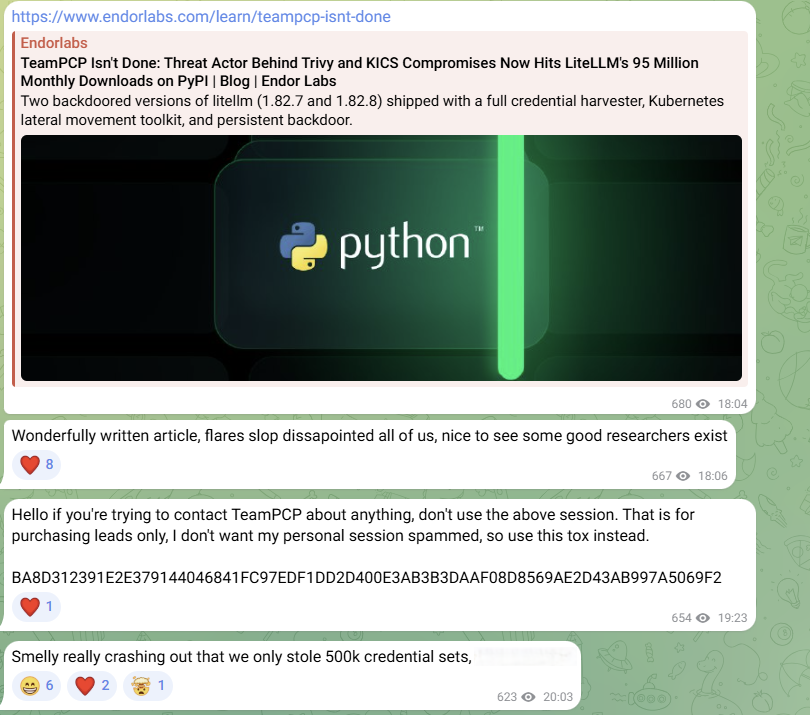
On TeamPCP’s Telegram channel, they announced that they had stolen 500,000 credentials from the LiteLLM supply chain compromise.
Remediation and Response
Immediate Actions
- Identify affected systems: Run pip show litellm on all systems and check if version 1.82.7 or 1.82.8 is installed. Check for thepresence of litellm_init.pth in site-packages/ directories.
- Uninstall and purge: Remove litellm 1.82.7/1.82.8 from all environments. Purgepip/uv cache (pip cache purge, rm -rf ~/.cache/uv) to prevent reinstallationfrom cached wheels.
- Check for persistence: Look for ~/.config/symmon/symmon.py and~/.config/systemd/user/symmon.service. On Kubernetes clusters, auditkube-system namespace for pods matching node-setup-* and review cluster secrets for unauthorized access.
- Rotate ALL credentials: Assume every credential accessible on the affected machine is compromised.
Network Forensics
- Audit outbound connections to models.litellm[.]cloud, checkmarx[.]zone, and scan.aquasecurtiy[.]org infirewall and proxy logs
- Review DNS query logs for resolution of these domains
- Check for outbound HTTPPOST requests with X-Filename: tpcp.tar.gz header
- Monitor for connections to169.254.169.254 from unexpected sources (IMDS credential theft)
CI/CD Pipeline Audit
- Review all CI/CD pipelines that installed litellm without version pinning in the past 48 hours
- Audit Docker images built with pip install litellm (unpinned) during the compromise window
- Check for transitive dependency pulls; litellm is a dependency of many AI agent frameworks and MCPservers
- Verify that CI/CD secrets were not exfiltrated by checking for tpcp-docs repositories in organization GitHub accounts
Long-Term Hardening
- Pin all dependencies to exact versions and verify package integrity against the upstream sourcerepository, not just registry RECORD hashes
- Use lockfiles and verify they are not blindly updated
- Implement network egress controls to restrict outbound connections from production environments
- Enable PyPI trusted publishers to prevent direct token-based uploads
- Downgrade to litellm 1.82.6(last known-clean release) or upgrade to a version confirmed clean on GitHub
.svg)








.svg)